Adding iCals to Google Calendar
Using the internet calendar integration you can add Items or Facility booking activity into your Google calendar. This will automatically update in Google calendar* and provide a read-only view of bookings.
Step 1 - Get the iCal URLs you need
iCAL urls are located in 3 different areas of SchoolBooking
My Profile - Use the iCal URL here to view all of 'your' bookings in Google calendar
Lettings - Facility Manager - check the facilities individually to find the iCal URL
Bookings - Item Manager - select an Item, for more settings
When you have found your iCal(s) copy the URL or save a list ready to add into Google.
Step 2 - Add internet calendar in Google
Go to Calendar in Google, and under 'Other Calendars' select Add, and choose From URL
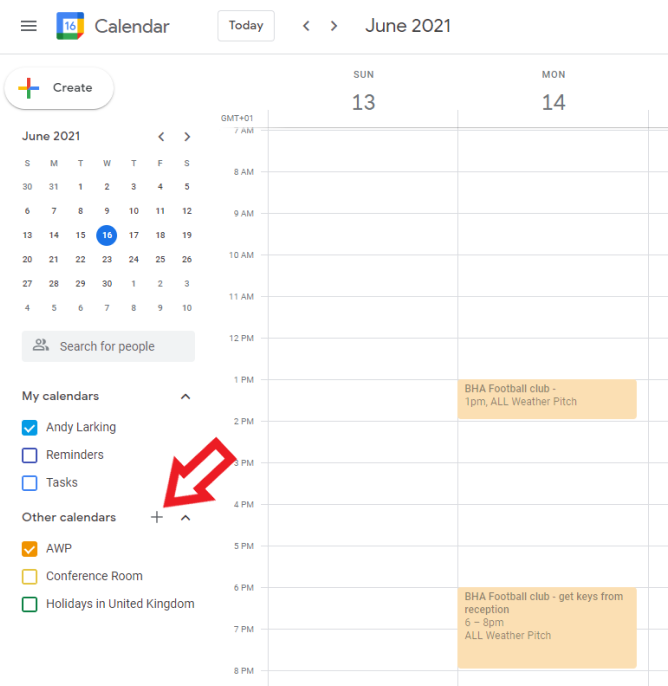
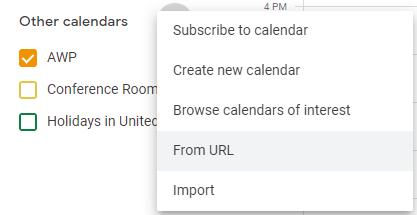
Now Paste the ical URL you need from Step 1, and select 'Add Calendar'
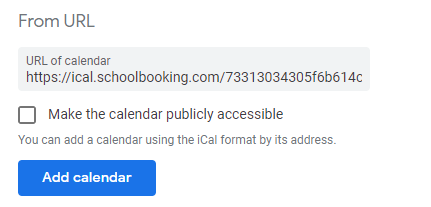
Google will indicate the calendar has been added and you will see the new calendar which you can now select.
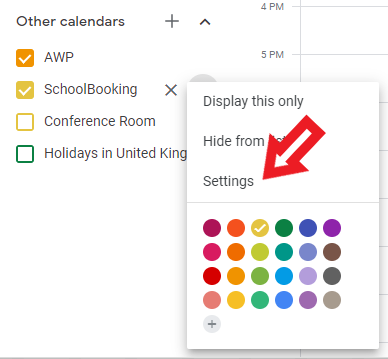
Depending on your settings this may not have a recognisable name. You will probably want to change to the Facility name. Click on the three vertical dots next the calendar and choose Settings
Note : * Google inbound icalendar refresh interval has been recently changed by Google services so some changes can take upto between 12-24hrs to update.