Parent Waiting List for Fully Booked Teachers
This feature allows parents to join a waiting list when a teacher is fully booked. Event organizers or admins can review the list and either follow up with parents after the event or extend the session to create additional appointment slots and book on their behalf.
Setup
Enable the waiting list option in Site Settings:

Parent Experience
When a teacher is fully booked, parents will see the option to Join Waiting List:
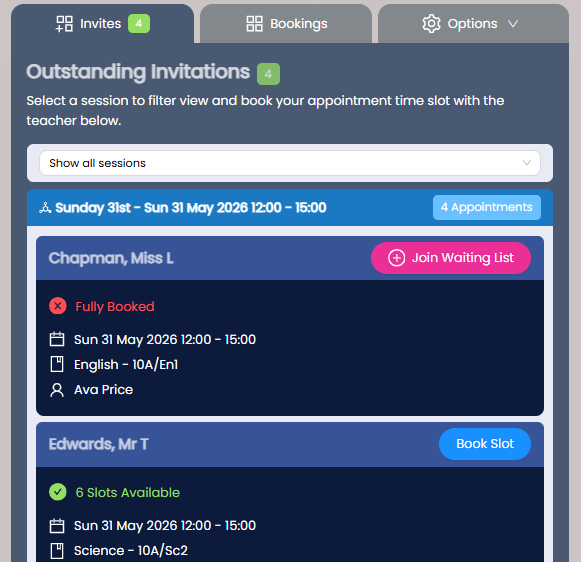
Parents can submit a comment when joining and remove themselves from the list if no longer needed.
Using the Waiting List
Go to Event Reports - Waiting List to review each request, including parent comments. Download the waiting list to follow up with parents after the event, or use Actions to book available slots if another parent cancels an appointment:
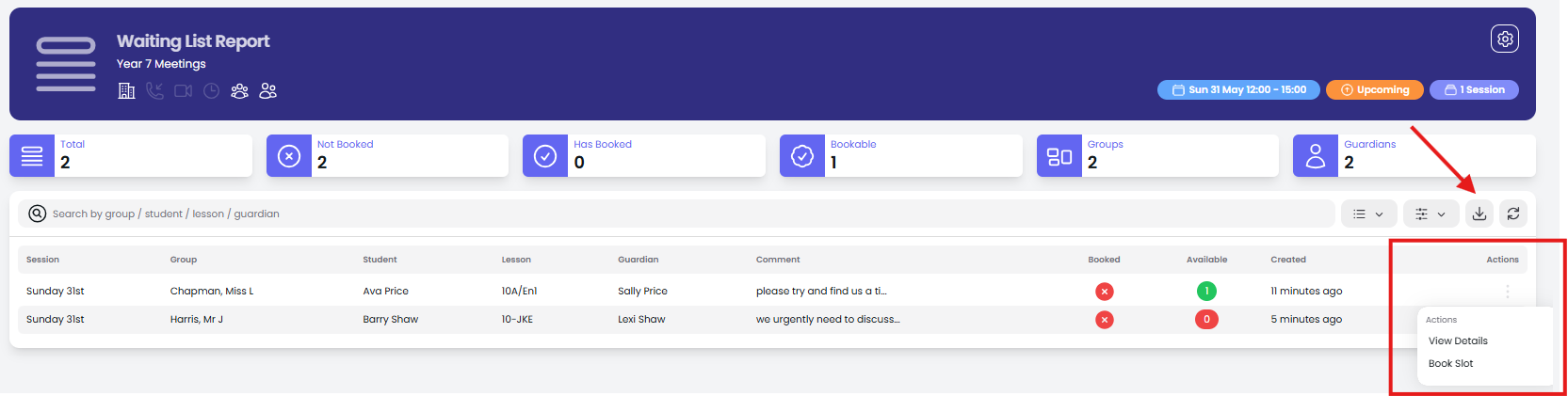
Create extra appointment slots
If the many of your teachers are fully booked you may want to consider extending the session(s) to provide extra appointment slots. See this article on how to extend sessions.
Alternatively, you should check to see how many slots are disabled for a teacher (ie. for a breaks) and see if any of these can be made available. You should also send your booking confirmation emails to parents. The booking confirmation email includes an option for non-attendance. If a parent decides they can't attend you can cancel the parent bookings and re-book in the wait list.
See Non Attendance Option